o
Cronjob.de calls your URLs on schedule, logs your server's response and tells you when something breaks. No cron daemon of your own, no server access needed, in operation since 2003.
Almost every set of instructions from a host, a shop or a CMS ends in a text that beginners cannot use. Just paste it here. We read out the address, the method and the schedule, ask if something is missing, and fill in the form with it. Nothing is saved until you submit it yourself.
Scheduling
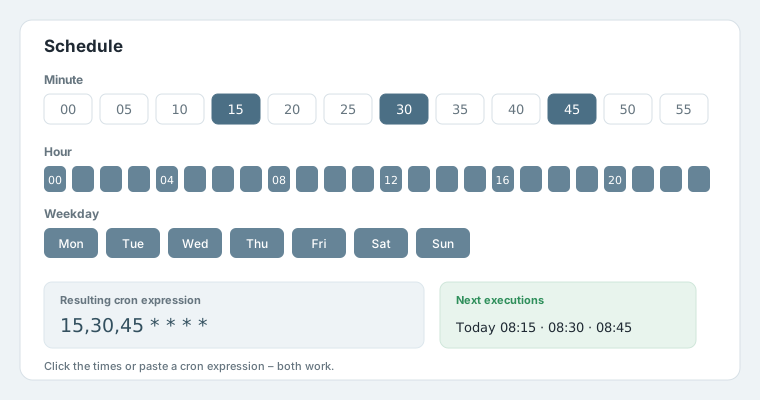
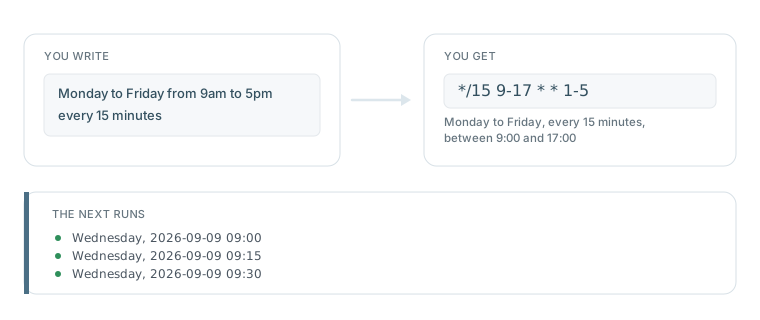
Pick minutes, hours, days, months and weekdays. If you know crontab syntax, just type it in. Both ways lead to the same result, and you immediately see when the job runs next.
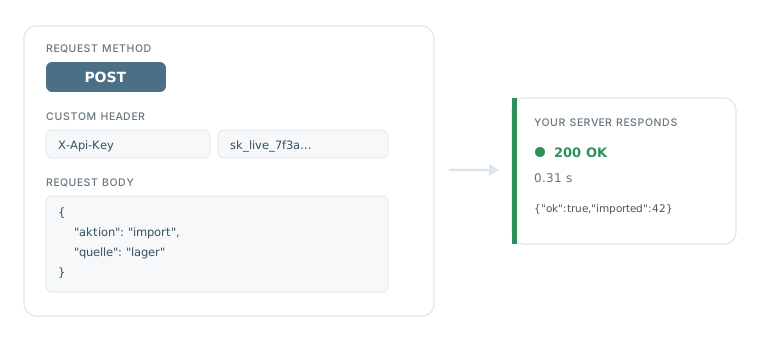
You choose the method, send data along and set your own headers. That lets you drive someone else's API just as well as your own scripts – from handing an order to an ERP system to calling a service's webhook.
Looking for an API to Cronjob.de itself? That exists as an MCP connection: manage cronjobs with Claude, ChatGPT or your own scripts.
You will find this in the Advanced tab when creating a cronjob.
Call log
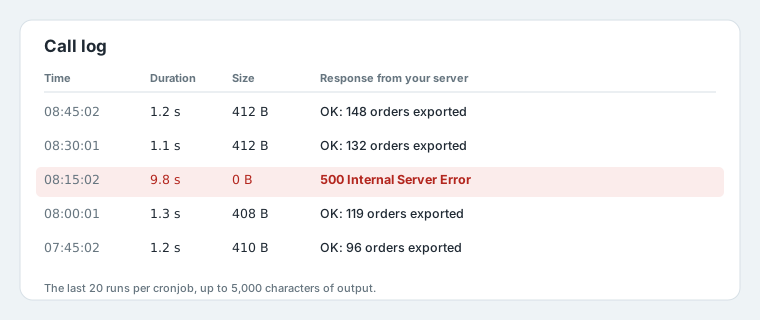
A cronjob that seems to run but does nothing is the most expensive kind of failure. That is why Cronjob.de stores your script's response for every call, not just a checkmark. This cronjob log is available in your account at any time.
Statistics
The last 200 runs form a curve for duration and output size. That is how you spot an import that grew from 2 to 20 seconds, or an interface that has been returning empty responses since yesterday.
Included in the Unlimited plan.
Notification
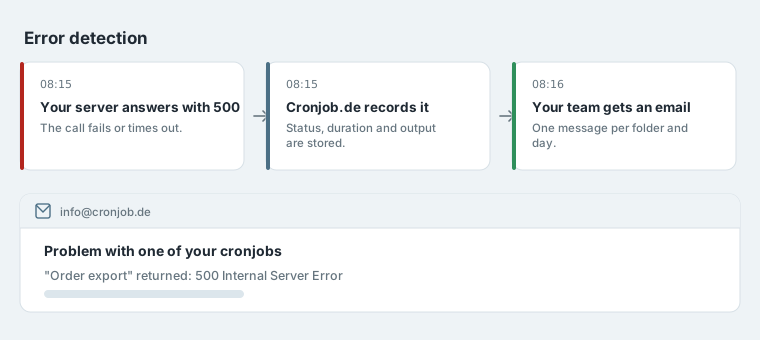
If your server answers with an error or not at all, you get an email. We report the change, not the ongoing state: a cronjob that runs every minute and fails produces exactly one message – and a second one when it works again.
SSL MONITORING New
Every time we call your cronjob we also see how long the certificate of that address is still valid. On request we let you know in good time – by email, to a different address than the cronjob alerts if you like.
Sounds like yesterday's problem now that Let's Encrypt renews itself? In practice things still expire: a certificate somebody bought by hand, a renewal that quietly fails, a subdomain nobody thinks about any more. An expired certificate stops payments and interfaces, and nobody tells you – until a customer calls.
Included in the Unlimited plan. Off by default – you decide whether you want to hear about it.
MAINTENANCE MODE New
Installing an update, migrating, backing up the database – and your cronjobs keep running and keep failing. That costs error notifications, needless load and, in the worst case, half-finished imports. One click pauses everything, a second one starts it again.
The difference to switching things off by hand: we remember what was running. When you end it, exactly that state comes back – cronjobs you had deliberately switched off stay off. With 200 cronjobs you would otherwise have to tick them one by one and remember which ones they were.
Included in the Plus and Unlimited plans. You can end it by hand at any time.
Team logins New
Colleagues get their own login with their own email address and password. Everyone works under their own name, and when someone leaves, exactly their access goes – everyone else keeps theirs.
AI access (MCP) New
Cronjob.de speaks the Model Context Protocol, MCP for short. Connect Claude, ChatGPT, Cursor or another assistant to your account and just ask – instead of clicking through lists.
Operations
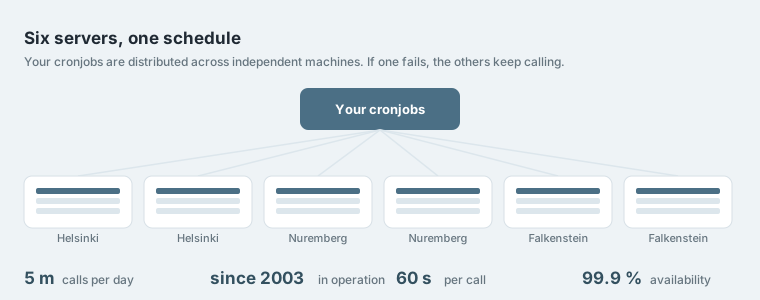
Calls are spread across independent machines in Helsinki, Nuremberg and Falkenstein. Each takes its share of the jobs from the same list. If one fails, the others keep going.
Limits
No asterisks, no hidden conditions. What applies in your plan:
| Free | Plus | Unlimited | |
|---|---|---|---|
| Cronjobs | 5 | unlimited | unlimited |
| Smallest interval | 5 minutes | 1 minute | 1 minute |
| Runtime per call | 45 s | 60 s | 60 s |
| Output size | 5 MB | 5 MB | 5 MB |
| Call log | no | 20 runs | 20 runs |
| Runtime statistics | no | no | 200 runs |
| Email on errors | no | no | yes |
| Webhook on errors | no | no | yes |
| Server monitoring | no | no | yes |
| Team logins | no | no | unlimited |
| AI access (MCP) | no | no | yes |
| Confirmation that the jobs are still needed | after 3 months without signing in, by email link | not required | not required |
Every new account starts with 14 days of Unlimited. See pricing
In use
A cronjob here is always a call to a URL. What your script does behind it is up to you.
Export orders, sync stock levels, update prices, generate invoices.
Many hosting plans offer no cron at all or only one call per day. WordPress, TYPO3 and Shopware need more.
Back up databases, clear caches, tidy log files, delete temporary files.
Work through sending queues, send reminders, check subscriptions.
Sync data between systems, read feeds, fetch exchange rates and weather data.
Collect key figures, generate daily and monthly reports and send them automatically.
Email address, password, URL, schedule. That is all it takes. The first 14 days with every Unlimited feature, then continue for free.